

1
Open Deposit
2
Copy your Solana address
ryft shows it with a QR code and a copy button.
3
Send USDC on Solana to it
4
Wait a few seconds
Your balance updates as soon as the transfer confirms.
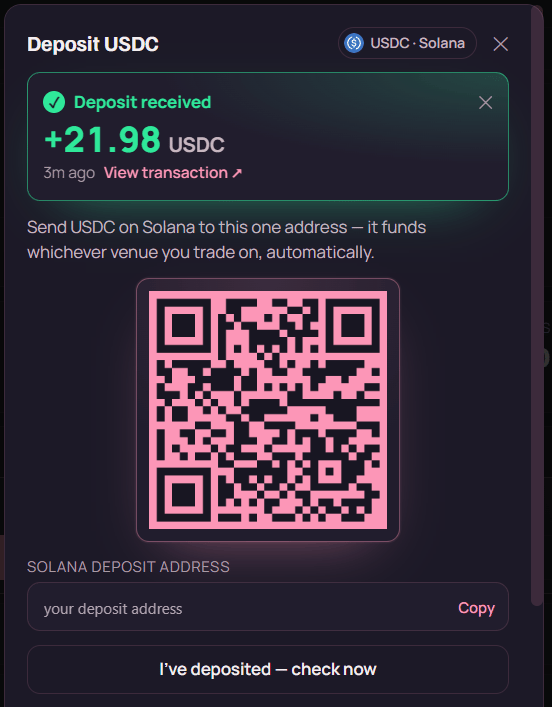
The deposit dialog: one address, shown as a QR and as text, plus a confirmation banner once the transfer lands. The address here is a placeholder — yours appears in the app.
Get these three things right.The token must be USDC. Sending SOL, USDT, or any other token will not credit your balance.The network must be Solana. USDC exists on Ethereum, Arbitrum, Base, Polygon and BNB Chain — only
USDC on Solana arrives here. This is the single most common way people lose a deposit, and it is
not recoverable through the app.The address is yours, permanently. Derived from your custody wallet, so it’s the same every time
you sign in with the same wallet. Save it, and top up whenever you like.
Why one address covers every exchange
The venues ryft trades on live on different blockchains — Pacifica and Phoenix on Solana, Hyperliquid settling via Arbitrum, Aster on BNB Chain. Your deposit sits in your Solana pool as idle USDC. When you place a trade, ryft moves exactly what that trade needs to the right venue — a direct deposit if the venue is on Solana, or a bridge if it isn’t — as part of executing the trade. You never choose a chain, approve a bridge, or hold a balance per exchange.Confirming your deposit landed
The app shows, live from the chain: what’s sitting in your pool right now, your deposit history (newest first, each with an explorer link), and a total of everything you’ve deposited. Because this is read directly from Solana, it’s the chain’s version of events, not a cached number.One number that surprises people. The idle pool balance goes down when you open a trade.
That’s correct — the funds moved to an exchange to back your position. They’re not gone; they’ve
become collateral and show up in Equity on your portfolio. Your lifetime
deposited total doesn’t move.
Minimums and fees
ryft doesn’t charge a deposit fee. You pay the ordinary Solana network fee — a fraction of a cent. There’s no ryft-side minimum on the pool deposit, but individual exchanges have their own minimums for funds arriving on them. Deposit an amount too small to trade with and it simply sits in your pool until you top it up. Bridging to a non-Solana venue has a cost — a solver spread plus a small fixed fee. That’s shown in the trade preview before you confirm, never after.If your deposit doesn’t show up
- Has the transaction confirmed? Check the signature in your wallet or on Solscan. If it’s still pending, wait.
- Was it USDC? Another SPL token sent to the address will not credit.
- Was it on Solana? USDC bridged from another chain is the usual culprit.
- Is it the right address? Compare character for character — particularly the first and last
four. A copy that grabbed a truncated display (
ErmG…rGz9) instead of the full address will fail. - Is the right wallet connected? Each address is a separate account.
Safety. Deposit only to the address shown inside the app, on a ryft domain you navigated to
yourself. Never send to an address someone gave you in a DM, even if it looks like support. Support
will never ask you to “verify” your wallet by sending funds anywhere.