

1
Reclaim — venue → pool
Bring funds back from an exchange to your pool.
2
Withdraw — pool → your wallet
Send USDC from your pool to your own Solana address.
The rule underneath. Your money rests in the pool. Collateral sitting on an exchange is
temporary — it’s there to back a position. Once the position is closed, it comes home.
Step 1 — Reclaim funds from an exchange
Close the position first. Collateral backing an open position isn’t free to move; reclaim only takes free cash. Then reclaim, either for a specific amount or for everything free on that venue. It runs as a background job you can watch:
While a reclaim is in flight it appears in your balance as in flight, so the money is never
invisible: it’s either on a venue, in flight, or in your pool.
Reclaiming doesn’t require withdrawals to be enabled. Your funds never leave custody; they just move
from an exchange back to your own pool.
Step 2 — Withdraw from the pool
This is the only way money leaves ryft.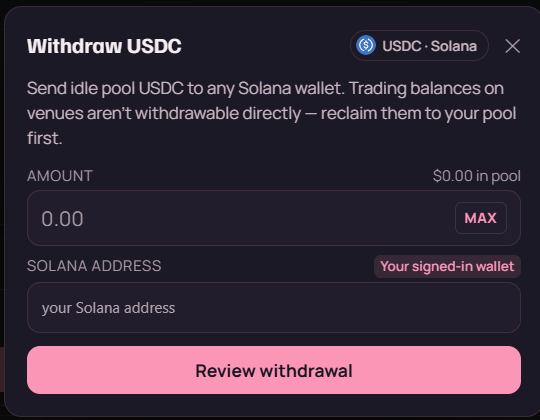
The withdraw dialog. Note the two constraints it states up front: it spends idle pool USDC only, and it pays out to a Solana address.
- Enter the amount in USDC.
- Enter the destination — a Solana address. It defaults to the wallet you signed in with, which is the safe choice.
- Confirm.
Everything lands on Solana. Withdrawals always pay out in USDC on Solana — regardless of
which exchange the funds were originally deployed to. The bridging back from Arbitrum or BNB Chain
happens during reclaim, before the money reaches your pool.So your destination must be a Solana address that you control. Not an Ethereum address, not an
Arbitrum one. If you’re sending to a centralised exchange, check its USDC deposit address is on the
Solana network — this is the most common way withdrawals go missing, and it isn’t recoverable.
If you don’t see a withdraw option
Withdrawals are gated per deployment and are off by default. When they’re off, the app says so rather than showing a button that would fail. There’s also a per-withdrawal cap when the feature is on — a larger balance goes out as several withdrawals. Reclaim is unaffected by that gate: you can always bring funds back from an exchange to your pool.What the errors mean
Security — read the address back. Anyone holding a valid session could send funds to any address,
so what protects your funds is your session and your wallet. Sign out on shared machines.
Never approve a signature request that arrived by DM. Read the destination address back before
confirming — check the first and last four characters against your wallet, not just the middle.On our side: withdrawals are off by default, capped per withdrawal when enabled, and every
destination is validated before anything moves. Destination allowlists and velocity limits are on the
roadmap, not shipped — so the address readback is genuinely your last line of defence.
If a withdrawal doesn’t arrive
- Check the explorer link the withdrawal returned. Solana confirms in seconds, so if the transaction succeeded, the funds are at the destination.
- Check you’re looking at a Solana wallet, not an Arbitrum or Ethereum one.
- Check the destination address matches what you intended.