

1
Pick a market
SOL-PERP, BTC-PERP, or anything in the market list.2
Choose a direction
Long profits if the price rises; Short if it falls.
3
Set your size and leverage
4
Read the preview
Expected fill, fee, routing, and ETA.
5
Confirm
Read the preview before you confirm
The preview is read-only — nothing moves while you’re looking at it.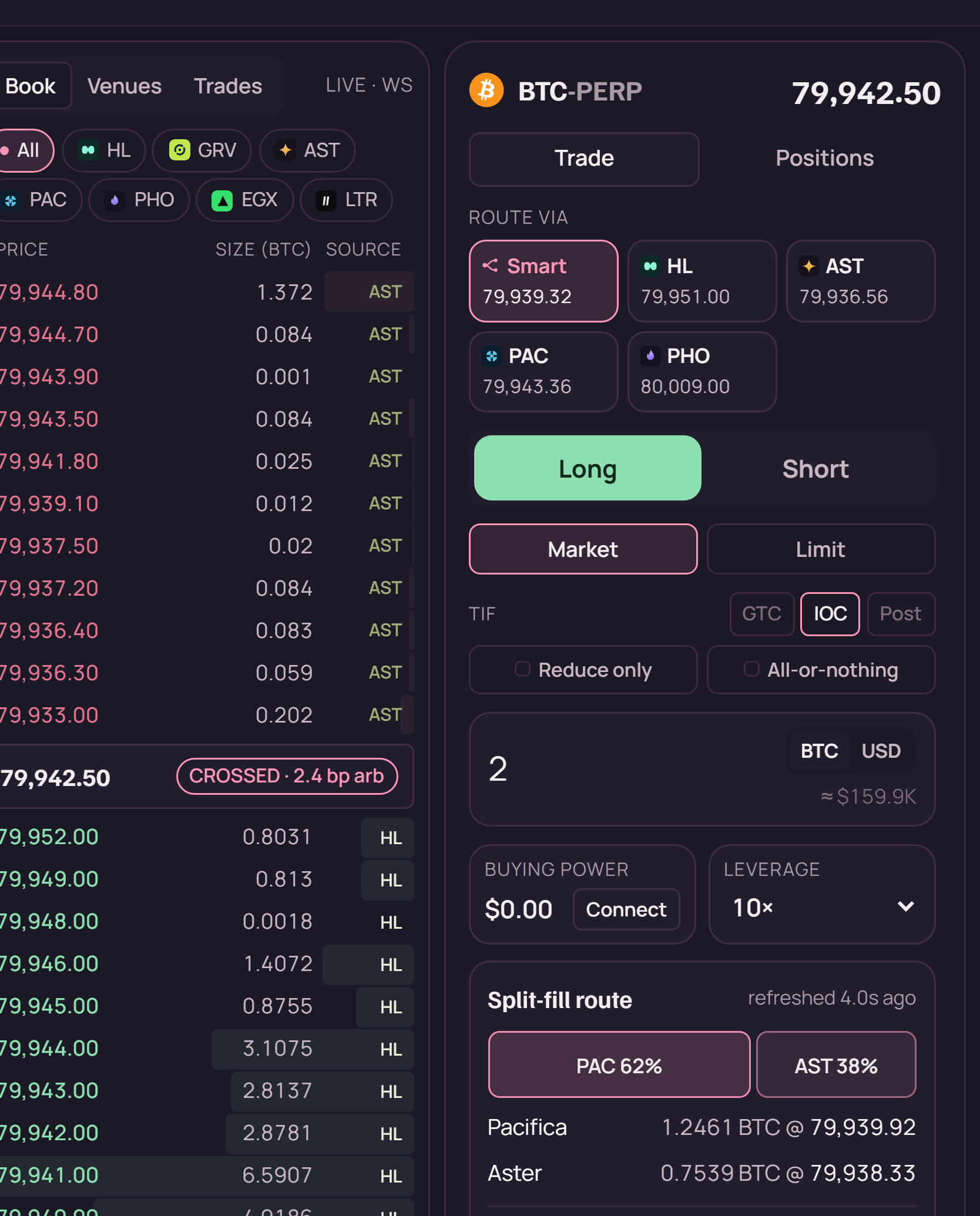
The order book and ticket in the terminal. Every level is tagged with the venue it came from, and the split-fill route updates as you change size.
HL, AST, PAC, PHO — so a fill is never anonymous.
If the size is bigger than the available depth, the preview says so rather than quoting a price it
can’t fill.
Warm and cold — why the first trade is slower
Your deposit sits in a Solana pool, and exchanges live on different chains. So the first time you trade on a given venue, your funds have to get there.- Warm — collateral is already on that venue. Fills immediately.
- Cold — funds move first. Seconds to about a minute.
A cold trade that seems stuck usually isn’t. Bridging takes as long as it takes; the ETA in the
preview is the honest estimate. If it exceeds that materially, the job reports an error rather than
hanging silently. Cold trades run in the background — you can leave the panel.
How routing picks a venue
ryft builds a consolidated order book from every live venue and walks it by price to fill your size as cheaply as possible. If the best fill is 3 on one exchange and 2 on another, the order goes out as two legs. The comparison is fee-adjusted — a venue with a better headline price but a worse taker fee can lose, because what you pay is the all-in number. If you tell ryft how long you plan to hold, routing also prices in the funding you’ll pay or earn on each venue over that period. For a multi-day hold that can outweigh the entry price difference entirely — see funding. Routing only considers venues ryft can actually execute on. You can override it and force a specific venue if you want.Market and limit orders
- Market — fills now, at the best available price across venues. Use when getting in matters more than the exact price.
- Limit — fills only at your price or better. Use when the price matters more than certainty of filling. It may not fill at all.
Closing a position
Open the Positions panel and close from there. Like opening, closing runs as a background job. Closing returns your collateral on that venue — it stays there, which keeps your next trade on that venue instant. To bring it back to your Solana pool, reclaim it; to take it off ryft entirely, reclaim then withdraw.What can go wrong
Your money is never unaccounted for. If a job reports
failed, the error names the stage that
failed. Funds are always in exactly one of three places: your pool, on a venue, or in a position.Risk. Positions can be liquidated — closed automatically at a loss — if the market moves
against you far enough. At 20× leverage that’s roughly a 5% move. ryft shows your liquidation price
on every open position. Know it before you open, not after.